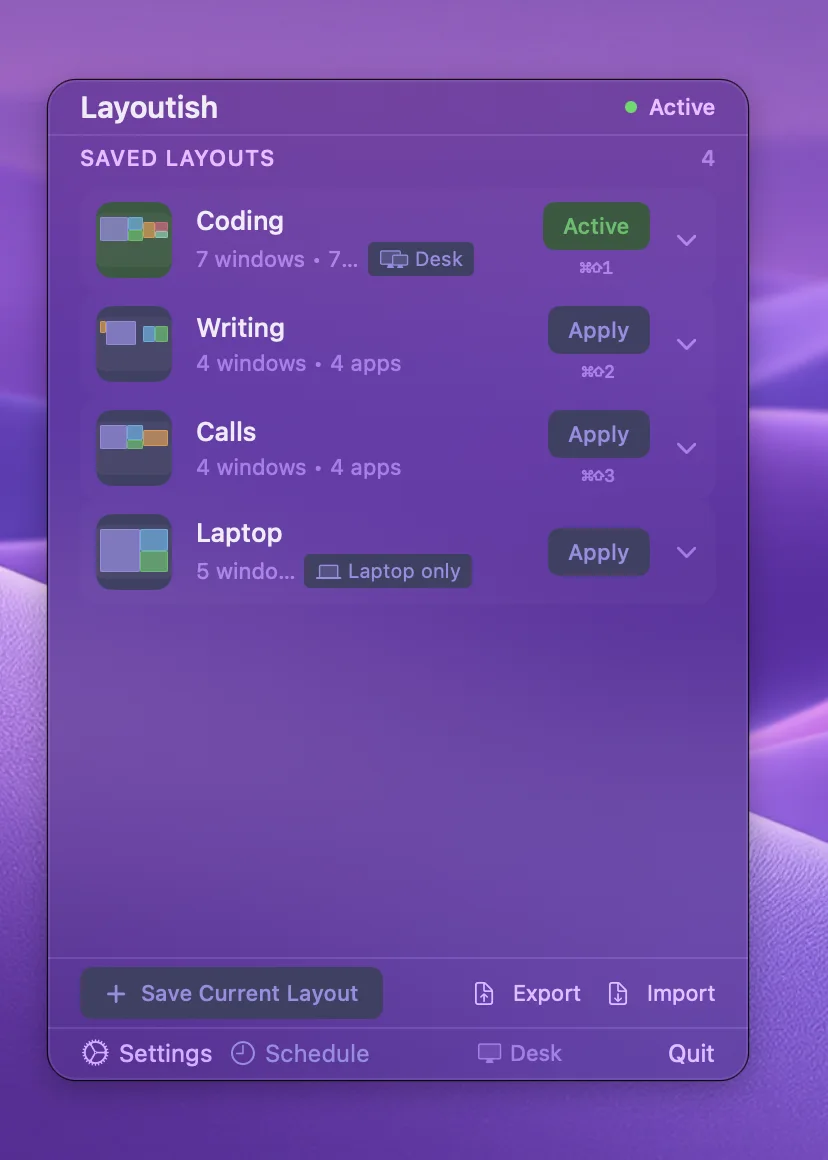
Unplug a monitor, come back from a meeting, restart for an update: your windows are somewhere else. Layoutish saves where every window goes and puts them all back with a click or a hotkey.
Needs Accessibility only. Never asks for Screen Recording
Layouts live on your Mac. Export them as a file whenever you like
Three things macOS won't do for you
Remember where your windows go, put them back, and do it by itself when your monitors change.
1One click
Every window back where it was, closed apps reopened
Arrange your desk the way you like it and save it. From then on, one click or one hotkey puts each window back at its saved position and size, in the same front-to-back order. Apps that were closed are opened and placed too.
Position, size, stacking order and minimised state, per window
Give any layout a hotkey and never open the menu again
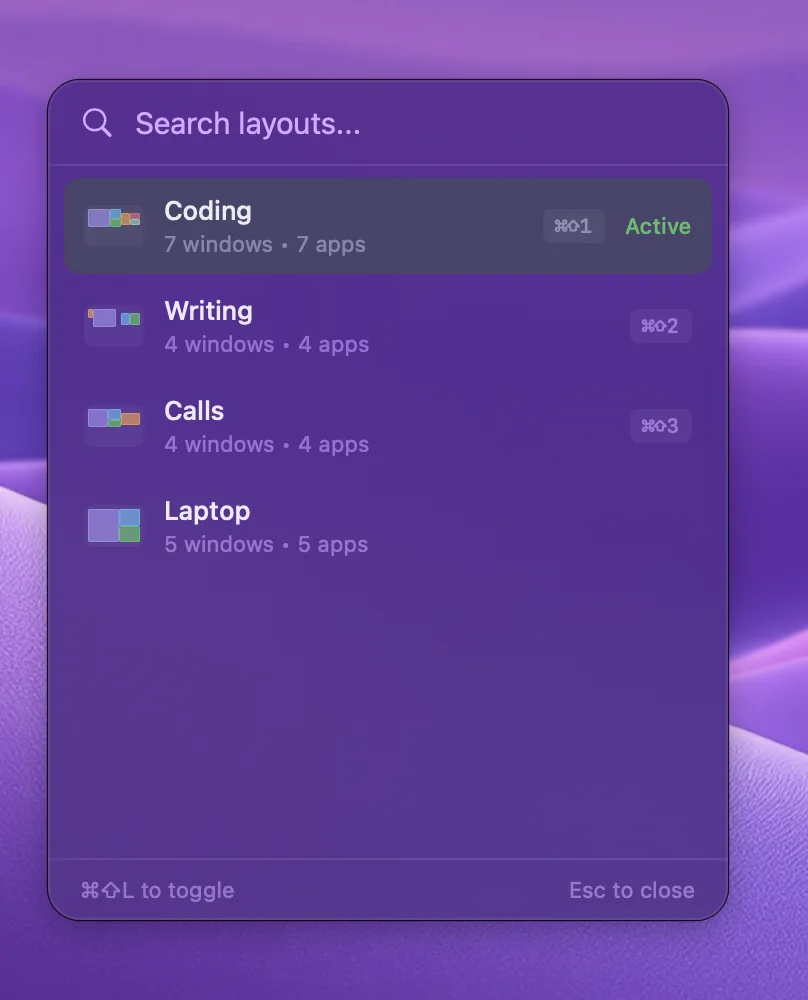
⌘⇧L opens a quick switcher that searches by layout or app name
Layoutish checks each window landed where you saved it, and retries the ones that didn't
Windows on another Space (desktop) are saved, but macOS gives no way to move a window that isn't on the current Space. Those stay put until you switch to that Space.
2Display profiles
Dock or undock, and the right layout applies itself
Save a display profile for each setup you use, the desk with two monitors and the laptop on its own, and pick a layout for each. When your monitors change, Layoutish notices and applies the matching layout a couple of seconds later.
Profiles recognise your monitors by name and resolution, so they survive reboots
One toggle turns auto-apply on or off for all profiles
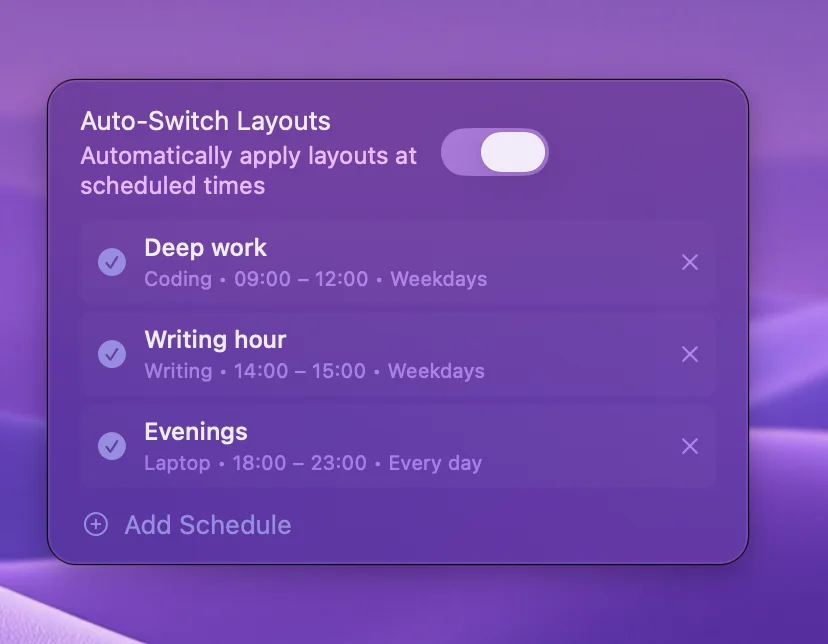
Schedules apply a layout at set times: a focus layout at nine, a calls layout at two
Layouts remember which displays they were saved for, and warn when one is missing
Profiles react to a monitor being connected or disconnected. Waking from sleep with the same monitors doesn't change anything, so nothing is applied then.
Coding is linked to the Desk profile, Laptop to the Laptop only profile.
3Every monitor, every Space
Captures the whole desk, or just one screen
A layout covers every monitor and every Space, including minimised windows and the ones on other desktops. On a multi-monitor Mac you can also save or apply a single display, so a layout for the big screen leaves the laptop alone.
Windows on every Space are captured, not just the one you're looking at
Save one monitor's windows with the Capture picker, apply one with a right-click on Apply
Hidden (⌘H) apps stay hidden through a restore
Closed Finder windows are reopened at their saved folders
Across my 4 physical monitors and 12 to 15 virtual desktops, it was maddening how macOS would sometimes randomly move windows when it woke up. Layoutish has helped a lot with that. It's reduced my window reorg time by about half, and it wasn't very expensive, so I'm not complaining!
Layoutish customer
shared by email
Email
And the details that make it stick
Small things you notice on day three.
Update in place
Moved things around? Click Update on the layout and it re-captures without losing the name, the icon or the hotkey.
Leave some apps alone
Exclude any app from a layout and it's left where it is when you restore. Music can stay wherever you put it.
Windows you opened since are untouched
A new compose window or a fresh Finder window isn't in the layout, so a restore never grabs it.
Made for tricky apps
Electron, Qt and GPU-rendered apps (Canva, Proton Mail, Ghostty) report their windows oddly. Layoutish reads them through Accessibility, so they go back too.
Export and import
Every layout can be exported as a JSON file and imported on another Mac, or kept as a backup.
Nothing to learn
A menu bar popover with your layouts, an Apply button on each, and a save button. That's the whole interface.
⌘⇧L opens the quick switcher anywhere.
Schedules: a layout for a time of day, on the days you choose.
You asked, we shipped
Layoutish is made by one developer who reads every email. These came straight from customers.
Shipped in 1.3.5
8 September 2026
Your licence survives cleaner utilities and preference resets. It's restored silently from your login Keychain
Reported by two customers who were locked out after a cleaner wiped their settings.
Shipped in 1.3.2
11 June 2026
Windows on every Space are captured again, not only the desktop you're looking at
Reported by a customer whose layouts only ever saved the current desktop.
Shipped in 1.3.2
11 June 2026
The app stopped asking for its licence key at every restart, and now works offline for a week
Reported by a customer who had to re-enter the key after every reboot.
Also new lately
Display profiles that apply a layout when your monitors change (1.3.3)
Save or apply one monitor at a time (1.3.4)
Hidden apps stay hidden through a restore (1.3.4)
Closed Finder windows reopened at their folders (1.3.4)
Every window's landing spot verified and retried (1.3.4)
Missing something? Tell us what would make Layoutish right for you.
Save the current window arrangement with a name and an icon
Restore with a click, a global hotkey, the ⌘⇧L quick switcher or a schedule
Position, size, minimised state and front-to-back order per window
Apps that were closed are opened and placed
Every window's landing spot is verified, then retried once if it missed
Update a layout in place, keeping its name, icon and hotkey
Rename, duplicate, reorder and delete layouts
Exclude any app from a layout's restore
Windows opened since the save are never moved
Hidden (⌘H) apps stay hidden
Closed Finder windows reopened at their saved folders
No limit on the number of layouts
Monitors and Spaces6
Every monitor in one layout
Windows on every Space captured (restore reaches the current Space)
Save just one monitor's windows with the Capture picker
Apply just one saved monitor with a right-click on Apply
The Saved for line shows which displays a layout holds, and warns when one is missing
Works with stacked and side-by-side monitor arrangements
Profiles, schedules and hotkeys7
Display profiles: a named monitor setup with a default layout
Auto-apply when monitors are connected or disconnected, a couple of seconds after the change
Profiles match by monitor name and resolution, so they survive reboots and cable swaps
One master switch for auto-apply in Settings
Schedules: a layout for a time window on the days you choose
A global hotkey per layout (with ⌘, ⌥, ⌃ or ⇧)
⌘⇧L quick switcher with search by layout or app name
Everyday5
Lives in the menu bar; a small popover is the whole interface
Launch at login
Export all layouts to a JSON file and import them elsewhere
Accessibility is the only permission it uses
Updates through Sparkle when you click Check for Updates
How the 7-day trial works
No card, no account, no catch.
1
Enter your email
We send one email with your download link. No card, and you can unsubscribe in one click.
2
Switch on Accessibility
Open Layoutish, click the Accessibility banner, and turn Layoutish on in System Settings. That's how it moves windows. Then save your first layout. The 7 days start when the app first opens.
3
Keep it, or don't
Like it? It's $9.99 once, and you paste a licence key into Settings. If not, do nothing. You're never charged.
And after the trial?
After 7 days, Apply and Save pause until you add a licence key. Your layouts, hotkeys, profiles and schedules are all kept, and you can still rename, export or delete them. Nothing is removed.
Yes. Layoutish is $9.99 once. There's no subscription and no paid upgrade, and every update so far has been free to everyone who bought it.
Does it work with multiple Spaces (desktops)?
Capture does: a layout includes windows on every Space, not only the one you're looking at. Restore can only move windows that are on the current Space, because macOS gives apps no way to reach a window on another desktop. Windows on other Spaces keep their place until you switch to that Space.
My windows scramble when I unplug my monitor. Does Layoutish fix that?
Yes, that's the main reason people buy it. Save a layout for the desk and one for the laptop alone, then save a display profile for each setup with that layout as its default. When you unplug or plug in, Layoutish notices the change and applies the matching layout a couple of seconds later. Waking from sleep with the same monitors doesn't trigger anything, because nothing changed.
Which permissions does it need, and why?
Accessibility, and only that. It's how macOS lets an app read and move other apps' windows. macOS doesn't show a prompt for it: open Layoutish, click the Accessibility banner, and switch Layoutish on in System Settings. Layoutish never asks for Screen Recording, Input Monitoring or Automation.
Can I use it alongside Rectangle or Magnet?
Yes. Snapping tools move one window at a time when you ask; Layoutish puts a whole saved arrangement back. They don't interfere with each other. The one thing to avoid is giving both the same keyboard shortcut.
What if an app in the layout isn't running?
Layoutish opens it, waits for its window to appear, and places it. Apps that take a long time to open are placed in a retry pass a moment later.
Do windows go back to exactly the same place?
Almost always. Layoutish sets each window's position and size, then checks where it landed and tries again if it missed. A few apps insist on their own minimum size or snap to a grid, so those can end up a few pixels off. Restore runs app by app rather than all at once, so it takes a moment on a big layout.
Does it phone home?
There's no account and no analytics. Layoutish goes online for two things: checking your licence key with our payment provider, and looking for updates (a quick check at launch, or when you click Check for Updates). Your layouts stay on your Mac.
What happens when the 7-day trial ends?
Apply and Save pause and Layoutish asks for a licence key. Your layouts, hotkeys, profiles and schedules are kept exactly as they were. You are never charged automatically, because we never ask for a card.
Which Macs does it run on?
macOS 13.5 (Ventura) or later, on Apple Silicon and Intel.
Can I use my licence on more than one Mac?
Your key is for your own Macs. Moving to a new Mac? Click Deactivate on this Mac in Settings on the old one first. If the old Mac is gone, email hello@appish.app and we'll free the seat.
Can I get a refund?
We don't offer refunds. That's what the trial is for: every feature works for 7 days with no card, so you can be sure before you pay. If something's broken, email hello@appish.app and we'll fix it.